
Do you dream of getting your products in front of millions of potential customers in Pakistan? Look no further than Daraz.pk, the country’s leading e-commerce platform. Listing your products on Daraz is a breeze, and this guide will walk you through the entire process, from logging in to your Seller Center account to uploading products.
In this guide, you will learn how to list a single product on Daraz Seller Center. This step by step process requires you to fill out various fields for maximum product visibility on the Daraz website.
How To List A Product
Step 1:
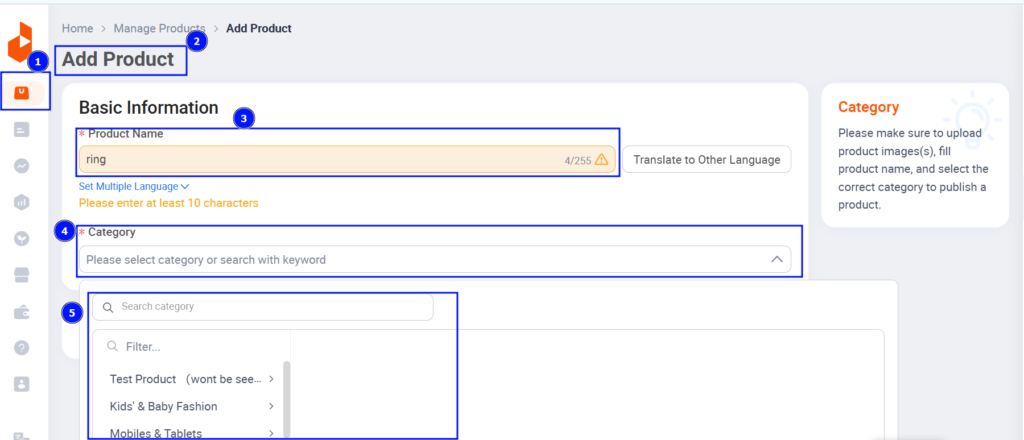
Login to the Seller Center. Go to ‘Products‘ Tab, Click on ‘Add Products‘.
Step 2:
You will now arrive at Add Product Page. Fill in the basic information. For example, we will list a Ring to be sold on Daraz.
Step 3:
Product Images: In this section, you can now add multiple images of your product through media center or upload from your computer. This includes adding a cover photo and 7 other optional images of your product directly.
Video URL: If there is a YouTube video demo of your product, you can add the link here.
Step 4:
Product Name: Use a formula to name your products. The text box suggests this formula may vary depending on product category, but it should include all relevant keywords to make sure your product is found during searches. Here’s an example of the formula:
[Brand Name] [Model Name] + [Key Product Specification] [Product Name] [Color]
Step 5:
Category: Choose the most relevant category for your product. The text box says there will also be category recommendations based on the product name you enter, or you can select a category manually.
Step 6:
Brand: Enter the name of the brand that makes your product. If there is no brand name, you can select “No Brand” from the options.
Fill in the highlights of your product
Step 7:
Avoid generic descriptions: Don’t use basic features like “long-lasting” or “high-quality” because these won’t make your product stand out.
Be specific: Mention details like warranty type (if applicable), screen size, screen type (such as HDR), and other key features.
Also, you can add the description in the local language.
Step 8:
Create variants of your product and add the price & stock
Step 9:
Color Family: Enter the color of your product.
Step 10:
After selecting a color, you can start creating your SKUs (Stock Keeping Units).
As you create SKUs, they will appear at the bottom of the page.
Step 11:
For each SKU, you can fill in details including:
- Price
- Promo Price/Special Price (optional)
- Quantity of your product
Seller SKU: A unique code to identify your product
Free Items (if any)
Step 12:
Warranty type: Select the type of warranty if applicable on your product. There’s also a prompt to fill in additional fields such as warranty period and warranty policy.
Package Weight: Fill in the weight of your parcel in kilograms (KG).
Package Dimensions: Input the dimensions of your package in centimeters (cm).
The Content Score feature automatically checks issues with your product content and provides tips to improve it. This means the feature will analyze your listing and give you suggestions on how to make it better.
This will help you resolve any issues with the content right there. This suggests that you can address the problems without leaving the platform.
Daraz Seller Policies
Category Restriction Policy: This policy covers restrictions on certain categories of products that can be sold on Daraz. The image instructs sellers to learn about these restrictions and how to sell items within restricted categories.
Prohibited Items: This policy details items that are completely forbidden to be sold on Daraz. The image instructs sellers to refrain from uploading prohibited products.
Restricted Brands: There are certain brands that require authorization to sell on Daraz. This policy details which brands are restricted and how sellers can get authorization to sell them.
By following these steps you can create compelling product listings that will grab attention and boost your sales. Remember to pay close attention to product details, descriptions, and high-quality images to set yourself apart from competitors.